

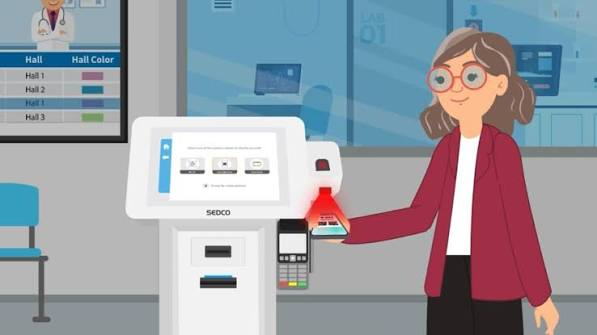
A crowded reception area can create frustration for patients before they even meet their healthcare provider. Long queues, repetitive paperwork, and administrative delays can make the check-in process unnecessarily stressful for patients and staff alike. A patient check-in kiosk offers a modern way to simplify registration, helping healthcare facilities streamline administrative tasks, improve the patient experience, and make better use of their front-desk resources.
What Is a Patient Check-In Kiosk?
A patient check-in kiosk is a self-service digital station that allows patients to complete registration tasks when arriving at a healthcare facility. Depending on the system, patients may be able to confirm their appointments, update personal information, complete forms, verify demographic details, and check in for scheduled visits.
These kiosks are commonly used in hospitals, medical clinics, specialist practices, diagnostic centers, and other healthcare environments. They provide patients with a convenient alternative to completing every registration step with reception staff.
The specific features available depend on the kiosk software, the healthcare provider’s requirements, and its integration with existing systems.
How Patient Check-In Kiosks Improve the Patient Experience
The check-in process is often a patient’s first interaction with a healthcare facility on the day of an appointment. Making this experience straightforward can help create a more welcoming environment.
Self-service kiosks allow patients to complete supported tasks at their own pace. Instead of waiting for staff to manually enter every detail, patients can review information and submit responses directly through the interface.
For returning patients, the ability to confirm existing information rather than repeatedly complete the same paperwork can make visits more convenient. Clear instructions, intuitive screens, and accessible interface options are particularly important for patients who may be unfamiliar with digital technology.
However, facilities should retain staff-assisted check-in options for patients who need additional help or prefer personal assistance.
Reducing Administrative Work for Healthcare Staff
Reception teams often manage multiple responsibilities simultaneously, including answering telephone calls, scheduling appointments, verifying patient information, processing paperwork, and directing visitors.
A patient check-in kiosk can help reduce some of these repetitive tasks by allowing patients to complete routine registration steps independently. This may give staff more time to assist patients with complex requests, resolve scheduling issues, and coordinate other front-desk activities.
Automating selected tasks can also help standardize the registration process. When information is collected through consistent digital workflows, staff may spend less time handling paper forms or manually transferring information between systems.
The overall benefit depends on how effectively the kiosk is configured and integrated into the facility’s existing operations.
Important Features to Consider
Choosing the right patient check-in kiosk requires careful consideration of the facility’s workflow and patient population.
User-friendly interface: Clear instructions, readable text, simple navigation, and accessible design can help patients complete registration with fewer difficulties.
Appointment verification: A kiosk may allow patients to locate or confirm scheduled appointments using approved identification methods.
Digital form completion: Depending on the system, patients may be able to complete intake questionnaires, review demographic details, and update relevant information.
Healthcare system integration: Compatibility with electronic health record systems, practice management software, and scheduling platforms can reduce duplicate data entry and help information move efficiently between systems.
Privacy and security: Healthcare facilities should evaluate access controls, secure data transmission, session management, and compliance with applicable privacy requirements. Screens should be positioned to minimize the risk of other visitors viewing confidential information.
Accessibility and language support: Features such as appropriate screen height, readable text, multilingual interfaces, and accessible input methods can make the check-in experience more inclusive.
The Importance of Integration With Existing Healthcare Systems
A kiosk delivers greater operational value when it works effectively with the healthcare facility’s existing technology. Without appropriate integration, staff may still need to re-enter information manually, reducing the benefits of automation.
Before selecting a solution, healthcare administrators should determine whether it can connect with their appointment scheduling systems, electronic health records, and other relevant platforms.
They should also clarify how information is validated, where it is stored, and which staff members can access it. A well-planned implementation should support accurate information handling without creating unnecessary complexity for patients or employees.
Protecting Patient Information
Patient privacy is an essential consideration in any digital registration process. Check-in kiosks may handle personal details, appointment information, and other sensitive healthcare data.
Healthcare organizations should evaluate whether a proposed solution supports appropriate security measures, including encrypted communications, controlled access, secure data handling, and automatic session termination after inactivity.
Facilities operating in the United States should also assess applicable requirements under the Health Insurance Portability and Accountability Act (HIPAA), where relevant. Compliance depends on the organization’s responsibilities, the information involved, and how the system is implemented and used.
Staff training and clear procedures are equally important for protecting information throughout the registration process.
Implementing a Patient Check-In Kiosk Successfully
Successful implementation begins with identifying the biggest challenges in the current check-in process. A healthcare facility might be trying to reduce waiting times, limit paperwork, improve data accuracy, or handle increasing patient volumes.
Once these priorities are established, administrators can evaluate kiosk features, integration requirements, physical placement, and accessibility needs.
Testing the system with staff and patients before a full rollout can help identify confusing instructions or workflow issues. Employees should understand how the kiosk works, how to assist patients, and what to do when the system cannot complete a registration task.
Facilities can then monitor indicators such as check-in times, patient feedback, registration errors, and staff workload to assess whether the implementation is delivering the intended benefits.
Conclusion
A patient check-in kiosk can help healthcare facilities modernize registration, reduce repetitive administrative tasks, and provide patients with a more convenient arrival experience. Its effectiveness depends on intuitive design, reliable system integration, strong privacy protections, and appropriate support for patients who need assistance.
By evaluating operational needs and planning implementation carefully, healthcare providers can use self-service technology to improve front-desk workflows while keeping patient care and accessibility at the center of the experience.
